Here is a refined, SEO-friendly blog for kpsingh.co.in, aligned with your Think Like a CEO philosophy and RTS Business Framework.
How to Build Systems and Process Automation for Business Growth
Stop managing every task. Start building a business that runs on systems, processes, and accountability.
Many SME business owners want to grow their businesses, increase revenue, serve more customers, and build stronger teams. However, as the business grows, daily operations often become more complicated.
Employees depend on the owner for decisions. Processes vary from person to person. Reports are delayed. Follow-ups are missed. Errors increase, and the business owner spends more time managing routine activities than planning future growth.
The solution is not always to hire more people. Often, the first step is to build the right business systems, standardize processes, and automate repetitive work.
As an Entrepreneur and SME Growth Coach, I believe that sustainable business growth requires more than hard work. It requires a structured approach to process management, team accountability, performance measurement, and technology adoption.
Let's understand how to build systems and process automation that help your business improve efficiency and scale sustainably.
What Are Business Systems and Process Automation?
A business system is a structured way of performing activities across an organization. It defines how work should be done, who is responsible, what resources are required, and how results will be measured.
A business process is a sequence of activities performed to achieve a specific outcome.
Process automation uses technology to execute repetitive or rule-based activities with minimal manual intervention.
For example, a structured sales process may define how enquiries are captured, qualified, assigned, followed up, and converted into customers. Automation can then assign leads automatically, schedule reminders, notify managers, and generate sales reports.
Together, systems, processes, and automation help create a business that operates with greater consistency, visibility, and control.
Why Do SMEs Need Strong Business Systems?
Many growing businesses depend heavily on the knowledge, experience, and personal involvement of their founders. This may work during the early stages, but it can become a barrier when the organization expands.
Here are some common challenges:
Founder dependency: Employees wait for the owner to make routine decisions.
Inconsistent processes: Different team members perform the same activity differently.
Missed opportunities: Sales leads and customer follow-ups are not managed systematically.
Limited visibility: Management cannot easily identify delays, bottlenecks, and performance gaps.
Repeated manual work: Employees spend valuable time entering data, preparing reports, and sending reminders.
Weak accountability: Responsibilities, expected outcomes, and deadlines are unclear.
Poor decision-making: Business decisions are made without reliable and timely information.
A well-designed operating system addresses these challenges by connecting people, processes, performance measures, and technology.
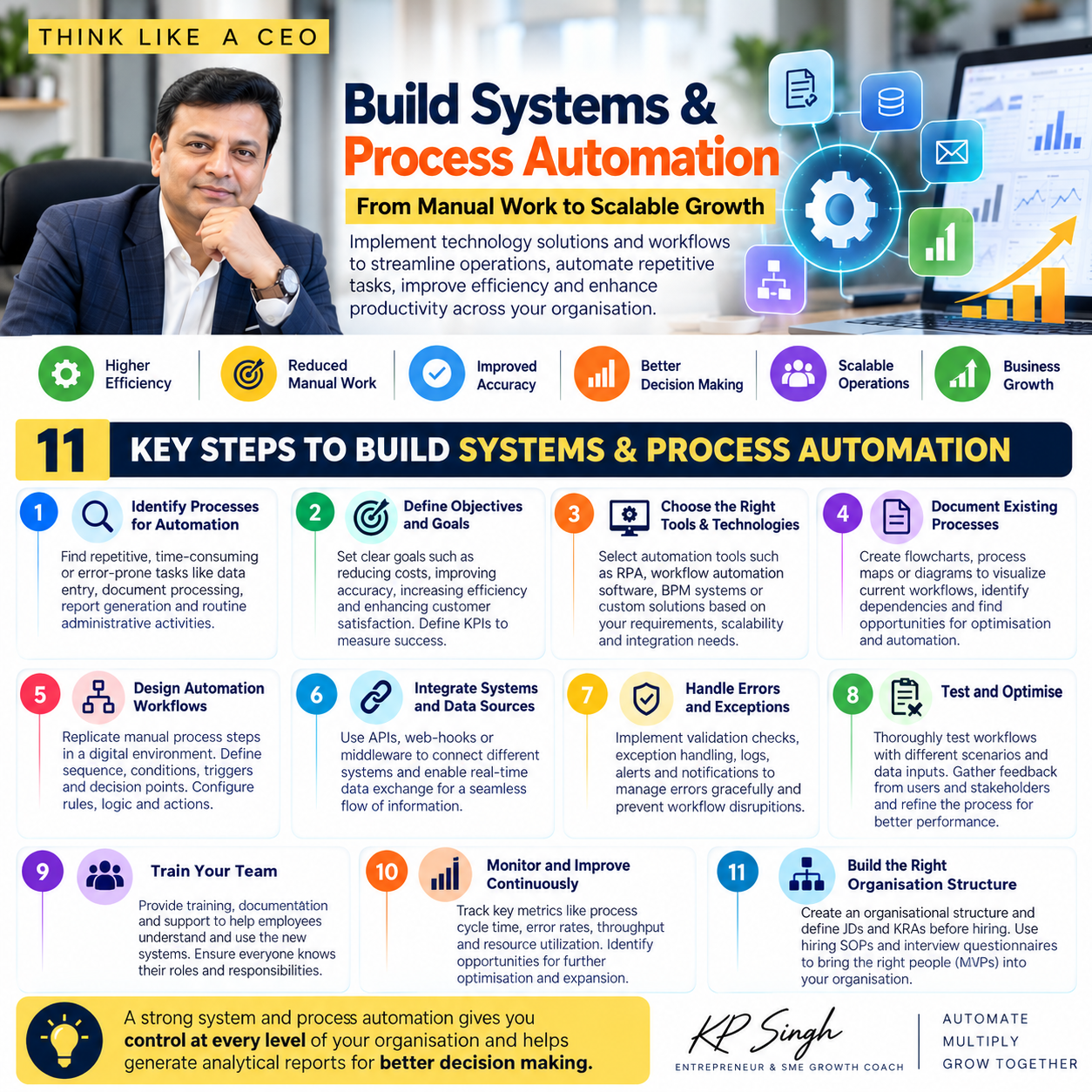
11 Key Steps to Build Systems and Process Automation
1. Identify Processes That Need Improvement
Start by identifying activities that are repetitive, time-consuming, error-prone, or dependent on a particular employee.
Common examples include:
Sales lead management and follow-ups.
Customer onboarding and service requests.
Inventory updates and order processing.
Invoice generation and payment reminders.
Employee attendance and leave management.
Production planning and project tracking.
Management reports and routine notifications.
Do not automate every activity simply because technology makes it possible. First identify which processes create the greatest operational problems or offer the greatest opportunity for improvement.
2. Define Clear Objectives and KPIs
Every automation initiative should have a clear business purpose.
Ask yourself:
What problem are we trying to solve?
What outcome do we expect?
How will we measure success?
Who will own the process?
What is the expected cost and implementation timeline?
For example, a sales automation initiative may aim to reduce response time to new enquiries, improve follow-up completion, or increase qualified lead conversion.
Define measurable KPIs before implementation so you can compare performance before and after the change.
3. Select the Right Technology
Choose technology according to your business requirements, process complexity, budget, and existing systems.
Possible solutions include:
CRM software for sales and customer relationships.
ERP software for integrated business operations.
Workflow automation tools for task routing and approvals.
Robotic Process Automation (RPA) for suitable repetitive digital tasks.
Business intelligence tools for dashboards and analytics.
APIs and integrations for connecting different applications.
Evaluate ease of use, scalability, security, integration capabilities, reporting, and total cost of ownership.
Remember: Technology should support your business process, not force your business into an unsuitable process.
4. Document Existing Processes and Create SOPs
Before automating a process, understand how it currently works.
Document each step, the people involved, the information required, approval points, expected timelines, and possible exceptions.
Use process maps, flowcharts, checklists, and Standard Operating Procedures (SOPs) to make the workflow clear.
For example, a customer onboarding SOP may define when a project starts, which documents must be collected, who configures the system, who trains the customer, and who confirms completion.
Documenting the process exposes unnecessary steps, duplication, and unclear responsibilities.
5. Design the Automation Workflow
Once the process is understood and improved, decide which activities can be automated.
A workflow may include:
Triggers that start an activity.
Conditions that determine the next action.
Rules that assign tasks or approvals.
Notifications and reminders.
Escalations for overdue activities.
Reports that track completion and exceptions.
For example, when a new sales enquiry enters a CRM, the system may assign it to a salesperson, set a response deadline, send a notification, and alert a manager if the lead remains unattended.
Keep human involvement wherever judgment, negotiation, approval, or customer understanding is essential.
6. Integrate Systems and Data Sources
Businesses often use different applications for sales, accounts, inventory, communication, and reporting.
When these systems operate in isolation, employees may have to enter the same information repeatedly, increasing effort and the risk of errors.
Where appropriate, connect systems using APIs, webhooks, or middleware.
Integration can help synchronize information, reduce duplicate data entry, and provide a more complete view of business performance.
However, integrations should have a defined business purpose, appropriate access controls, and clear ownership for resolving data inconsistencies.
7. Plan for Errors and Exceptions
No automated workflow should assume that everything will always go according to plan.
Data may be incomplete, an integration may fail, an approval may be delayed, or a customer may request an exception.
Build safeguards such as:
Data validation and mandatory fields.
Error logs and failure notifications.
Escalation rules for unresolved issues.
Retry mechanisms where appropriate.
Manual review for exceptional cases.
Backup and recovery procedures.
Automation should make operations more reliable, not create a new source of invisible problems.
8. Test Before Full Implementation
Test the workflow in a controlled environment before rolling it out across the organization.
Validate normal transactions, unusual scenarios, incomplete data, approval delays, and system failures.
Involve the employees who will use the process every day. Their feedback can reveal practical issues that may not be obvious during system configuration.
Start with a pilot wherever feasible, correct problems, document the revised process, and then expand implementation.
9. Train Your Team and Establish Accountability
A system delivers value only when people understand and consistently use it.
Train employees on the new workflow, their responsibilities, the software, and the expected standards of performance.
Every process should have:
A clearly identified process owner.
Defined roles and responsibilities.
Measurable expectations.
Appropriate decision-making authority.
Escalation procedures.
Regular performance reviews.
This is where leadership matters. Business owners and managers must follow the same processes they expect their teams to follow.
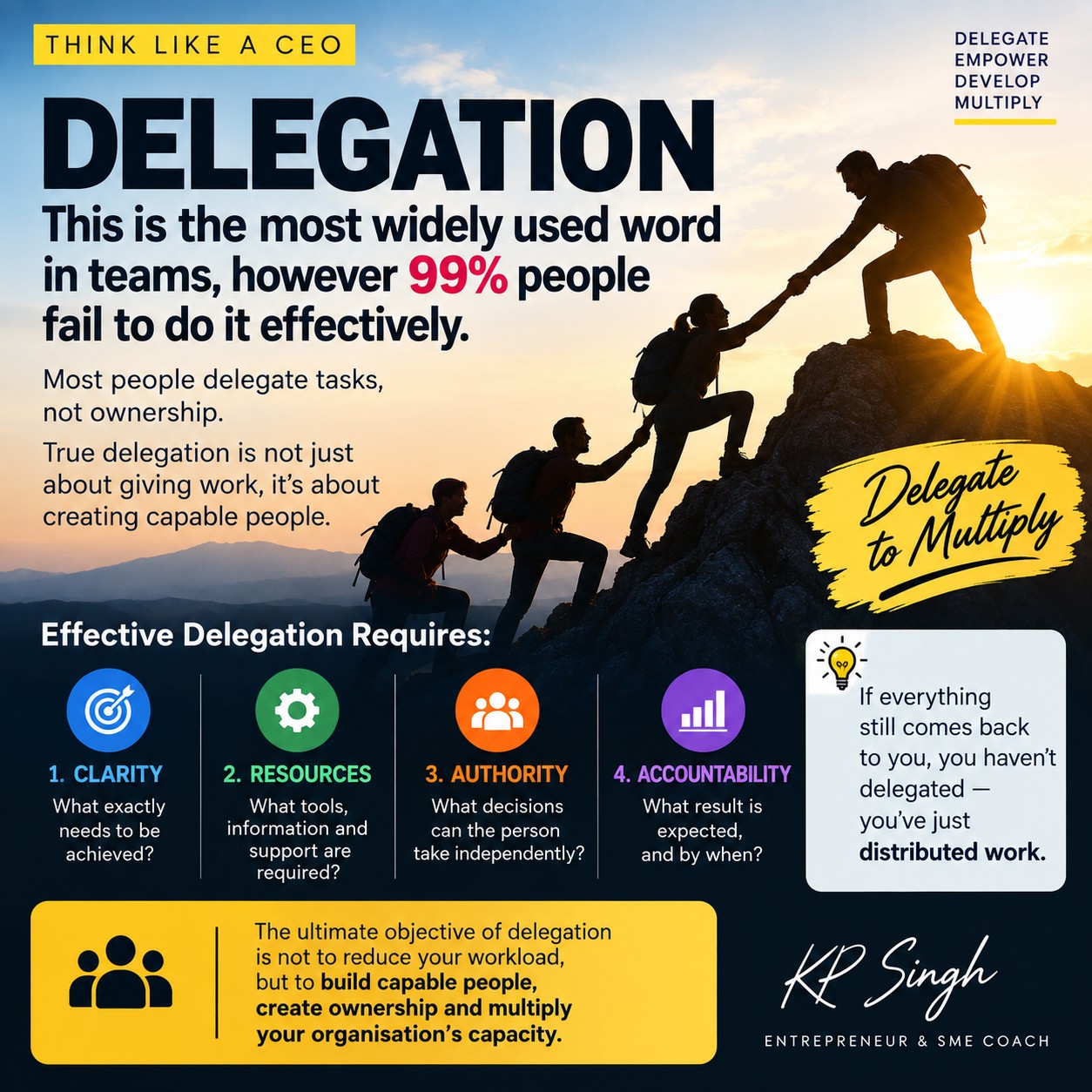
Do not delegate only tasks. Delegate ownership, authority, and accountability.
10. Monitor Performance and Improve Continuously
Implementation is not the end of automation. It is the beginning of continuous improvement.
Monitor indicators such as:
Process completion time.
Error and rework rates.
Overdue tasks and pending approvals.
Customer response and resolution time.
Employee productivity.
Cost per transaction.
Customer satisfaction.
Achievement of business KPIs.
Review the results regularly and identify opportunities to simplify workflows, improve training, fix bottlenecks, or expand automation.
A monthly process review can help ensure that the system continues to support changing business needs.
11. Build the Right Organizational Structure Before Hiring
One common mistake is hiring employees first and deciding their responsibilities later.
A scalable organization needs a clear structure that defines roles, reporting relationships, decision-making authority, and performance expectations.
Before hiring, consider the following:
Define the organizational structure: Determine which functions and leadership roles your business requires.
Prepare job descriptions: Specify responsibilities, qualifications, expected outputs, and reporting relationships.
Define KRAs and KPIs: Establish what each role must achieve and how performance will be measured.
Create hiring SOPs: Standardize sourcing, interviews, evaluation, selection, and onboarding.
Hire for role fit: Evaluate capabilities, attitude, learning ability, and alignment with the responsibilities of the position rather than relying only on a resume.
The goal is to hire the right people for clearly defined roles and give them the systems and authority needed to succeed.
How to Build a System-Driven Organization
A strong business operating model connects five essential elements:
1. People: The right people in the right roles.
2. Processes: Standardized workflows and documented SOPs.
3. Performance: Clear goals, KRAs, KPIs, and regular reviews.
4. Technology: Integrated software and appropriate automation.
5. Governance: Defined ownership, decision-making authority, controls, and accountability.
When these elements work together, management can monitor operations, identify problems early, and make decisions using reliable information.
The Role of CRM and ERP in Business Automation
CRM and ERP systems can provide the digital foundation for implementing and monitoring business processes.
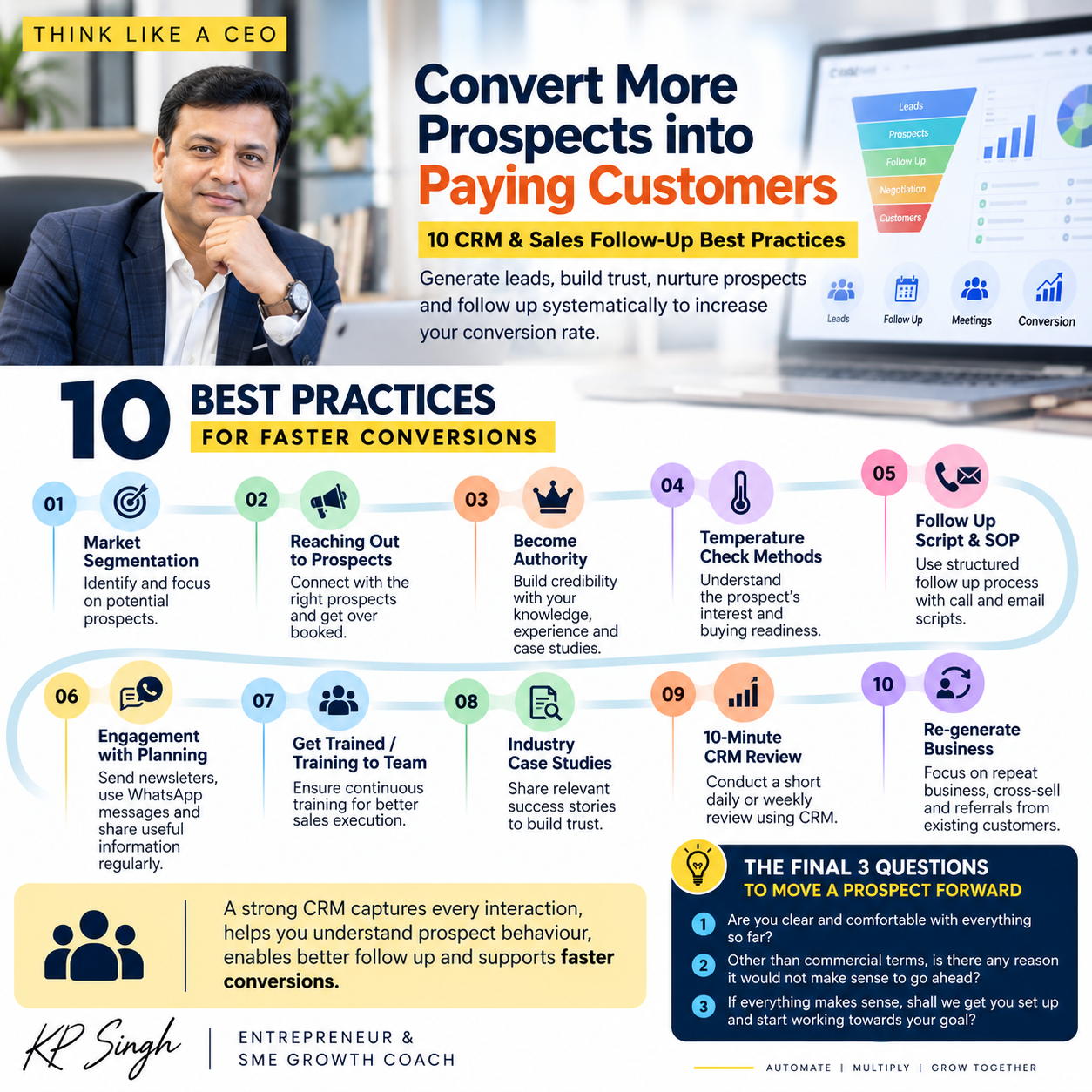
A CRM helps manage leads, sales activities, customer communication, quotations, and follow-ups.
An ERP can connect operational activities such as inventory, order processing, accounts, purchasing, production, and other business functions.
Depending on the software, these systems may also provide workflow automation, alerts, approval mechanisms, and management reports.
For SMEs, an integrated business platform can reduce information silos and improve visibility across departments. However, software selection should follow process analysis, not precede it.
The right system is one your team can adopt, your management can use to make decisions, and your business can scale with.
Common Mistakes to Avoid
Even well-intentioned automation initiatives can fail when organizations overlook the basics.
Avoid these mistakes:
Automating a poorly designed process without improving it first.
Purchasing software without clearly defined business objectives.
Implementing too many changes simultaneously.
Ignoring employee training and adoption.
Failing to assign process owners.
Measuring software usage instead of business outcomes.
Over-automating activities that require human judgment.
Ignoring data quality, security, and access controls.
Treating implementation as a one-time project rather than an ongoing improvement process.
Start with the most important business problems, demonstrate measurable improvements, and expand gradually.
Conclusion: Build Systems Before You Try to Scale
Business growth should not mean increasing complexity, workload, and dependency on the founder.
The objective is to create an organization where people understand their responsibilities, processes work consistently, technology reduces repetitive effort, and management has the information needed to make timely decisions.
Through the Think Like a CEO philosophy and the RTS Business Framework, I encourage SME owners to focus on building the right mindset, setting clear goals, standardizing processes, developing capable teams, and using technology to improve execution.
Remember, automation alone does not create a scalable business. The combination of people, processes, accountability, and technology does.
Stop depending on individual effort for every result. Start building systems that multiply your organization's capacity.
KP Singh — Entrepreneur & SME Growth Coach
Ready to Systemize Your Business?
If your business depends too heavily on you, your team struggles with accountability, or your processes are difficult to monitor, start by identifying the three workflows that create the most operational friction.
Document them, assign ownership, define measurable outcomes, and evaluate where technology can help.
Think Like a CEO. Systemize. Automate. Multiply.
Explore the RTS Business Framework and SME Growth Accelerator Programs to develop a practical roadmap for your business.
Leave a Comment
Your email address will not be published. Required fields are marked *